Tag: travel

HDR Ohio River Panorama

This image is along the Ohio River in Louisville, Kentucky. The building on the left is the Muhammad Ali Center which serves as a multicultural center with exhibits, classrooms, distance learning facilities, an archival library, exhibit galleries, a retail space and a café. The mural on the side of the building is made up of individual tiles that really pop when shot with the HDR technique.  Here’s a link http://alicenter.org/site/ for more information about the Ali Center and it’s mission. I shot the panorama from the Louisville Belvedere in downtown Louisville using exposure values of +2, +1, 0, -1, -2 inorder to capture the full range of tones in the scene.

I created this image from twenty exposures of the scene which I stitched together in Photoshop CS5 after first merging each section of five exposures in NIK HDR Efex Pro 2. I used five exposures for each section of the panorama which I first brought into NIK HDR Efex Pro 2 from Aperture 3. Once in NIK HDR Efex Pro 2 I applied the Realistic Deep preset which I then adjusted to suit my concept for the overall image. After merging and adjusting the first set of exposures in NIK HDR Efex Pro 2  I created a custom preset that I then applied to each of the other sections of the image after merging them in NIK HDR Efex Pro 2 in order to create a consistent tonal range in the final panorama.

After completing the HDR merges in NIK HDR Efex Pro 2 I took the four resulting images into Photoshop CS5 where I used the Automate Photo Merge setting to create my panorama. I then cropped the Photoshop image to clean up the edges before returning it to Aperture 3 where I made some final adjustments to the vibrancy and sharpening before saving the final image.

NIK HDR Efex Pro 2 did a fantastic job of anti-ghosting in the HDR processing which kept the texture of the water and definition in the clouds. I had it set for 100% anti-ghosting which seem to work very well in these types of situations. I hope this helps you the viewer see the possibilities that using NIK HDR Efex Pro 2 along with Photoshop CS5 and Aperture 3 offer when making panoramas.

Alabama Morning

Alabama Morning

These Fords were in a wrecking yard in Alabama a couple of years ago. The cars I find in the southern states have a much different patina of rust on them than the cars out west of the Mississippi River do. The climate in the south is much more humid and therefore the rust is more agressive. The oxidation process creates a much rougher surface which in turn traps more moisture that then eats away at the metal more aggressively.

I liked the way the early morning sun was lighting the scene and how it really emphasized the texture on the 1949 Ford in the foreground. The contrast of the smooth chrome and glass in the headlights really caught my eye. The cars are framed to in a typical rule of thirds composition and the rust on the roof in the background draws the viewer’s eye back in the scene while reinforcing the colors of the cars.

There wasn’t much I needed to do in processing to get this image finished. I used a little of the Spicify preset in Topaz Adjust to punch up the texture and saturate the colors before returning the image to Aperture 3 for final sharpening and output.

Golden Hour on the Clark Memorial Bridge

Golden Hour on the Clark Memorial Bridge
(Click on the image to open in a separate window)

This image is on the Clark Memorial Bridge approach from Louisville looking north into Indiana. I chose this composition because I like the way the bridge railing and sidewalk lead the viewer’s eye into the image. The afternoon glow of the “Golden Hour” on the bridge and in the sky is a nice contrast to the coolness of the shadows in the lower third of the image.

I processed this image in NIK HDR Efex pro using the Realistic (Strong) preset as my base point. After the six images were merged I applied the anti-ghosting at the high setting which cleaned up the cars on the bridge and reduced the ghosting they were exhibiting. I then slightly adjusted the shadows and highlights sliders before saving the image back into Aperture 3. I then reopened the photo in Aperture 3 where I did some further enhancement to the colors and vibrancy before the final sharpening.

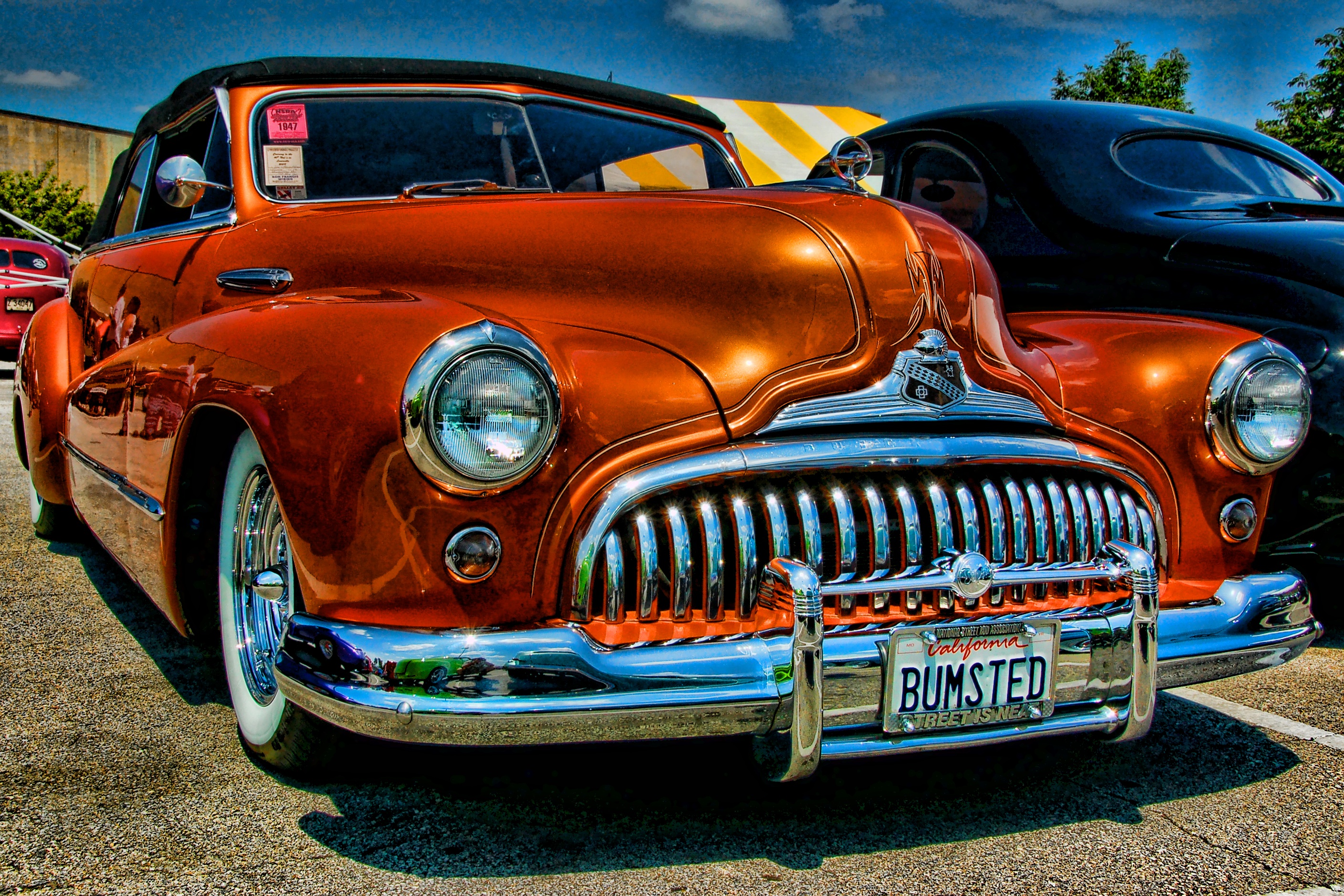
Bumsted

Bumsted

This image is another photo from the NSRA Streetrod Nationals in Louisville, KY. I processed this image using the Topaz Adjust Spicify preset. Not a lot to add about processing except to point out that the fact that when using presets such as Spicify there is always the potential for excessive noise in the image. I processed this image at a time when I was just starting to use Topaz Adjust and looking back at the image I would probably dial the strength of the preset down some in an effort to reduce the noise in the sky and the reflections in the paint on the car.

I like the composition for a couple of reasons in particular the low camera angle that really emphasizes the voluptuous form of the car. The placement of the subject creates a tension as the car seems to be moving forward in the frame. I did this to showcase that massive grill and front bumper and to emphasize the front vanity license plate. The complimentary colors of the orange car with the blue sky add interest from the standpoint of color balance.

Louisville Waterfront Sunset

Waterfront
Louisville Waterfront Sunset

I took this image last week from the Clark Memorial Bridge. I used five exposure values +2, +1, 0, -1, -2 to capture the scene. I then processed them in NIK HDR Efex Pro to merge and tonemap the image. I also reprocessed the merged image with the anti-ghosting feature set at medium to clean up the vehicles on the highway and any ghosting in the clouds.  I chose the Realistic Strong preset as my starting point and then tweaked the sliders until I had the colors and details where I wanted them. After that I returned the image to Aperture 3 for a little boost to the color temperature and sharpening.

I am especially pleased with the way the sky is reflected in the YUM Center in this image. I had been trying for several weeks to catch a sunset that was dramatic enough and high enough in the sky to reflect in the building’s convex glass. I checked cloud maps every evening for almost a month in hopes of being able to capture a dramatic sky such as this one. Many times the clouds would be where I wanted them 30 minutes before sunset only to fade away just as the sun set. On this particular evening the cloud map showed a  lot of clouds out to the west so I set up my camera and tripod on the Clark Memorial Bridge and waited for their arrival. I was rewarded by these clouds moving in at just the moment  the sun was setting.

Studying your location and accessing relevant sources, such as the cloud map, can really help when seeking to capture an image that you see in your mind’s eye. Keep this in mind the next time you wonder why you can’t seem to catch the scene you are seeking, patience and planning will eventually pay off if you do your part too.