Tag: reflections

Ohio River Sunset

Ohio River Sunset
(Topaz Version)

Today I decided to give this image from an HDR bracket set a quick processing with Topaz Adjust 5. I started with the Spicify preset which I then tweaked slightly before sharpening and exporting the image. What I hope I demonstrated is that a dramatic image is possible with minimal processing provided your original photo is an interesting composition.

HDR Ohio River Panorama

This image is along the Ohio River in Louisville, Kentucky. The building on the left is the Muhammad Ali Center which serves as a multicultural center with exhibits, classrooms, distance learning facilities, an archival library, exhibit galleries, a retail space and a café. The mural on the side of the building is made up of individual tiles that really pop when shot with the HDR technique.  Here’s a link http://alicenter.org/site/ for more information about the Ali Center and it’s mission. I shot the panorama from the Louisville Belvedere in downtown Louisville using exposure values of +2, +1, 0, -1, -2 inorder to capture the full range of tones in the scene.

I created this image from twenty exposures of the scene which I stitched together in Photoshop CS5 after first merging each section of five exposures in NIK HDR Efex Pro 2. I used five exposures for each section of the panorama which I first brought into NIK HDR Efex Pro 2 from Aperture 3. Once in NIK HDR Efex Pro 2 I applied the Realistic Deep preset which I then adjusted to suit my concept for the overall image. After merging and adjusting the first set of exposures in NIK HDR Efex Pro 2  I created a custom preset that I then applied to each of the other sections of the image after merging them in NIK HDR Efex Pro 2 in order to create a consistent tonal range in the final panorama.

After completing the HDR merges in NIK HDR Efex Pro 2 I took the four resulting images into Photoshop CS5 where I used the Automate Photo Merge setting to create my panorama. I then cropped the Photoshop image to clean up the edges before returning it to Aperture 3 where I made some final adjustments to the vibrancy and sharpening before saving the final image.

NIK HDR Efex Pro 2 did a fantastic job of anti-ghosting in the HDR processing which kept the texture of the water and definition in the clouds. I had it set for 100% anti-ghosting which seem to work very well in these types of situations. I hope this helps you the viewer see the possibilities that using NIK HDR Efex Pro 2 along with Photoshop CS5 and Aperture 3 offer when making panoramas.

Big Eye

Stutz Bearcat at Keeneland

This image is from my trip to Keeneland’s 2012 Concours de’Elegance last Saturday. I am fascinated by the size and detail of the early automobiles I see at these events such as this headlight on a Stutz Bearcat. According to the owner this car is one of only three known to still exist.

Due to the size of the crowd it was nearly impossible to photograph the cars without someone stepping into the shot so I decided to shoot details of the cars instead. I was able to keep the crowd out of these shots because I moved in close to the cars and got down low in front of them. Sometimes I was even laying on the ground to get an angle that allowed for an interesting composition; the people around me must have thought I was having a stroke when they saw an old man prostrate on the ground. At any rate it helped to keep them out of my camera’s line of sight.

I first processed this image in NIK HDR Efex Pro 2 as an HDR from a single image and then saved it back into Aperture 3. I then took it into NIK Silver Efex Pro where I converted it to black and white. I made a few adjustment while in there and then back to Aperture 3 for my final processing. There were some branches intruding on the left side that I cloned out using the retouch feature in Aperture 3. I then made a few contrast adjustments and some minor sharpening before saving the image.

Keeneland Concours de’Elegance

HDR Efex Pro 2 Packard image
Blue Packard

I took a trip down to Lexington, Kentucky this past weekend to the Keeneland Concours de’Elegance auto show. I have always been interested in automotive design and an event such as this one allows me to see firsthand the craftsmanship and beauty of our automotive heritage.

This Packard caught my eye with it’s massive headlights and brilliant grillwork. I decided to shoot this image as a bracketed series of images in order to overcome the wide range of light that the dark car and the brilliant chrome created. I knew that I was going to finish this image as an HDR image when I shot it. I monitored my histogram which showed me that I had the full range of tones in four exposures which would result in a good HDR image once merged and tone mapped.

Back home in the studio I merged the four exposures in NIK HDR Efex Pro 2 and applied the Structurized 2 preset as my base image. I adjusted the structure, black point and white point sliders very slightly before saving the image back into Aperture 3. I had to place a control point on the building in the lower right side of the frame and increase the exposure on the stonework to keep it from being a dark distraction in the composition. Once the image was back in Aperture 3 I cleaned up some sensor spots that had been emphasized by the tone mapping and hdr conversion before adjusting the vibrancy and sharpening the image for final output.

The composition is a pretty straight forward rule of thirds and uses the repetition of form to unify it. That along with the complimentary color scheme of blue and gold makes this image work for me.

STOP!

STOP!

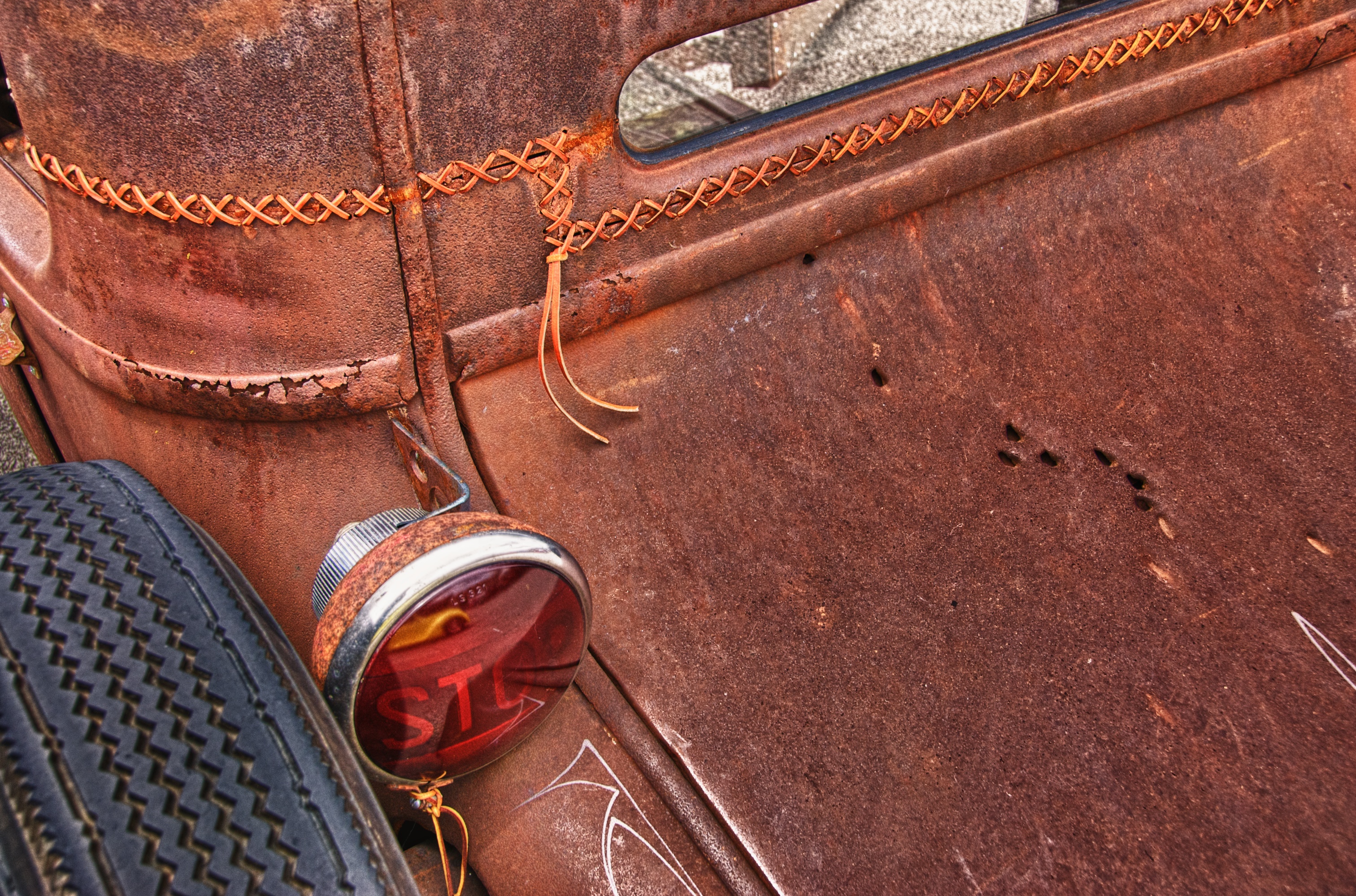
I found this car at a local car show. I have never seen a top that was chopped and then laced back together but the rat rod crowd does some interesting fabrication. I liked the way the rusted patina of the car contrasted with the slick finish of the yellow car reflected in the stop light. I thought the inclusion of the bullet holes in the rear deck lid helped add interest to the right hand side of the image.

I framed it in as a classic rule of thirds placing the red light at the intersection of the lower third section and the left third section. I processed this image using the NIK HDR Efex Pro plug-in and finished it in Aperture 3.