Tag: reflections

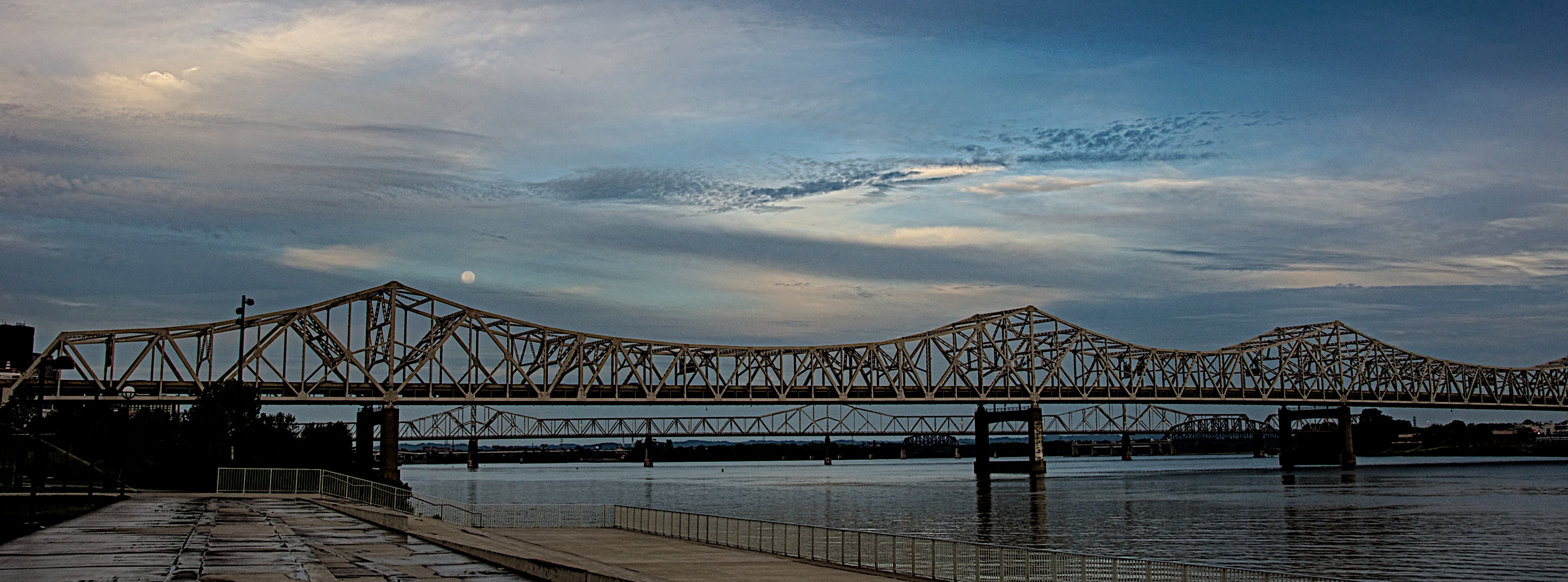
Blue Moon of Kentucky

Blue Moon of Kentucky

Click on the image to open it at a larger size in another window.

I went down to the riverfront yesterday morning to shoot the arrival of Hurricane Isaac in Louisville. Usually after a Gulf Coast hurricane moves inland it comes up the Mississippi River and then drifts east through the Ohio River Valley. I expected the sky to be rather dramatic and I was really hoping to capture the sunrise. I shot several images from Waterfront Park looking east and liked what I was getting. I applied my adage of “looking behind myself” to see if there was anything going on in the western sky when I saw the blue moon, a second full moon in one month, just above the Kennedy Bridge. The clouds were moving in from the southwest and I really liked the way they were drifting past the moon. I immediately shot a bracketed set of images from EV +2 through -2 in one stop amounts to capture as much detail as I could even though it was still at least 30 minutes before actual sunrise.

Back in the studio I opened the bracket set in NIK HDR Efex Pro 2 and merged them with the Ghosting Adjustment set to 20% which allowed the sky to stay as I envisioned it when I captured the scene. I started with the Deep 2 preset and adjusted the tone map and tonality until I had what I wanted. By boosting the Highlight and White sliders I got the moon to pop out of the clouds which was how I had originally envisioned the scene. I then took the image back into Aperture 3 where I cleaned up some sensor spots, subtly boosted the Vibrance slider and applied sharpening. I also cropped the final image into a panoramic framing to accent the linearity of the bridge before exporting it for the web.

Oldsmobile Rocket

Rocket 88
Rocket 88

Click on the image to open it at a larger size in another window.

I shot this image a while back and processed it using NIK Define 2.0 and Viveza 2.0 to bring out the colors in the photo. I liked the pinstripe work and the artist’s choice of colors for the car. It’s a simple image and there’s not much else to add about it.


A Postcard From Louisville

A Postcard From Louisville

Click on the image to open it at a larger size in another window.

I took this photo this morning from the Big Four Bridge looking southwest into Louisville. After cropping and adjusting the image in Aperture 3 I took it into NIK HDR Efex Pro 2 where I applied one of the Realistic presets, Deep 2. I adjusted the tonality as well as the black and white points before applying the Graduated Neutral Density filters. I dropped the sky approximately 1 stop and opened up the lower part of the image approximately 1/3 stop before adding the vignette to the final image.

Morning on the Ohio River

Morning Rower
Morning Rower

Click on the image to open it at a larger size in another window.

This image was taken this morning from the Big Four Bridge pedestrian ramp looking west toward Louisville. I spotted this rower and thought he made an interesting subject. The reflections on the river surface interested me too and I tried to frame the image in a way that would accentuate them.  I shot this image with my Nikkor 18-200 mm lens and a rented Nikon D90 and am a little concerned with the focus. I dropped this lens a couple of nights ago at the state fair and I’m worried that it may be slightly off in auto focus mode as the image looks a little soft to me. The past week I broke the cable release socket on my own D90 and had to send it in for service. As soon as it is back from the repair shop I think I’ll need to send the lens in for evaluation. I want to put it on my own camera first though to see if the rented camera may be the culprit.

I processed this as a single frame HDR using NIK HDR Efex Pro 2 using the Realistic preset. I dropped a couple of control points in the trees on the left to bring down the exposure there which was a little too wide due to the sunlight on the birch trees and the shadow being cast by the bridge. I them took the image back into Aperture 3 where I applied some noise reduction and adjusted the vibrancy slider before giving it a little sharpening.

Between the Bridges

Between the Bridges
Between the Bridges

Click on the image to open it at a larger size in another window.

This shot is a single frame that was first edited in NIK HDR Efex Pro 2 to adjust the tone map and tonality. I also added the vignette while in there. I then took the image back to Aperture 3 to sharpen it. I thought the preset added too much noise so I applied the Aperture 3 denoise adjustment and softened it slightly. I also boosted the vibrancy and detail a small amount to make the sky pop.
