Tag: panorama

Louisville Skyline

Spring Skyline

Click on the image to open it at a larger size in another window.

This image is the Louisville skyline viewed from the Indiana shore of the Ohio River. The bridge is the Clark Memorial Bridge which carries US 31 across the river. I shot this image early this past spring and processed it in NIK HDR Efex Pro and Aperture 3.

Stormy Morning in Louisville

Stormy Morning

Click on the image to open it at a larger size in another window.

This image is another HDR from a bracketed set of exposures. I was looking east from the Big Four Bridge around sunrise last week and found the sky to be very dramatic and foreboding. I really like the view from up on the bridge with the boat club on the left and the ramp up to the bridge on the right. In this composition I wanted to emphasize the many triangles that were formed by the channel on the left, the ramp and parking lot on the right and the clouds as they receded into the distance.

I merged the four exposures, +2, +1, 0, and  -1, in NIK HDR Efex Pro 2 to begin the tone mapping. I initially used an anti-ghosting setting of 20% but when I viewed the merged image there were several issues with the way the clouds rendered. I returned the merged image to the merge panel and applied 100% anti-ghosting which solved the problem. Normally I try to keep the anti-ghosting setting relatively low to avoid an artificial appearance but I have discovered that dramatic cloud formations really need it boosted to 80% or 100%. I think it has a lot to do with the speed that the clouds are moving, which is usually pretty fast, when they are part of a storm front such as this one.

I then started trying the various NIK HDR EFex Pro 2 realistic presets but did not find one that matched my intent for the final image. As I sorted through the many presets I discovered one named “Sinister” which was very close to what I wanted for the final effect. The only difficulty I encountered when applying the preset was that the foreground and foliage went way too blue and gray to suit me. I then placed a control point in the foliage and increased the exposure slightly. This served to lift the greens in the trees out of the shadows. Using that same control point I then raised the saturation very slightly and adjusted the vibrancy. What I was trying for was to get the scene to appear in the photo as it had appeared to me when I was capturing the bracket set.

The more I use NIK HDR EFex Pro 2 the more ways I find to create images that reflect the image I have in my mind when I trip the shutter. As I have said here in the past, my intent with many of my images is to create something that evokes my feelings for the subject and not necessarily a documentary photograph. I know that some photographers take issue with that line of thinking but as the quote in the masthead of this blog says “Art is not what you see, but what you make others see.” by Edgar Degas. I hope that my images evoke similar feelings in those who view my art.

Morning On The Ohio River #2

Cloudy Morning

Click on the image to open it at a larger size in another window.

I have been trying to catch the sunrise each morning from the Big Four Bridge. Yesterday I arrived at the bridge at the same time that a cold front was moving in from the southwest. The weather forecast was for rain to start by 10:00 am and the sky was very active as the front progressed.  I decided that it might be interesting to shoot the river and the Kennedy Bridge as I watched the clouds build up.

I set up my tripod looking west from the ramp going up to the Big Four Bridge and captured several five exposure bracket sets of the Kennedy Bridge. Back in the studio I opened the morning’s shoot and found this image. I usually try to get several variations of my subject when I shoot as I have learned over time that the best way for me to evaluate a composition is in the studio on the monitor. I chose this image because I liked the way the handrail swept into the frame.

I used all five exposures +2, +1, 0, -1, and -2, which I merged in NIK HDR Efex Pro 2. I used the default preset in NIK HDR Efex Pro 2 as my starting point as I started my tone mapping. I liked the way the sky and bridge had turned out but the lawn had acquired an over saturated green tone that was in conflict with the blues and grays of the rest of the image. I dropped a control point into the grass and desaturated it slightly to get it back to what I saw as I shot the scene. I find that these control point adjustments work well when there is a marked difference in the colors in the image where they are applied. In this case the green was so distinct in the image that it worked like a charm.

I returned the merged TIFF image to Aperture 3 where I adjusted the vibrance very slightly and applied some sharpening before exporting it as a jpeg for the web.

Blue Moon of Kentucky

Blue Moon of Kentucky

Click on the image to open it at a larger size in another window.

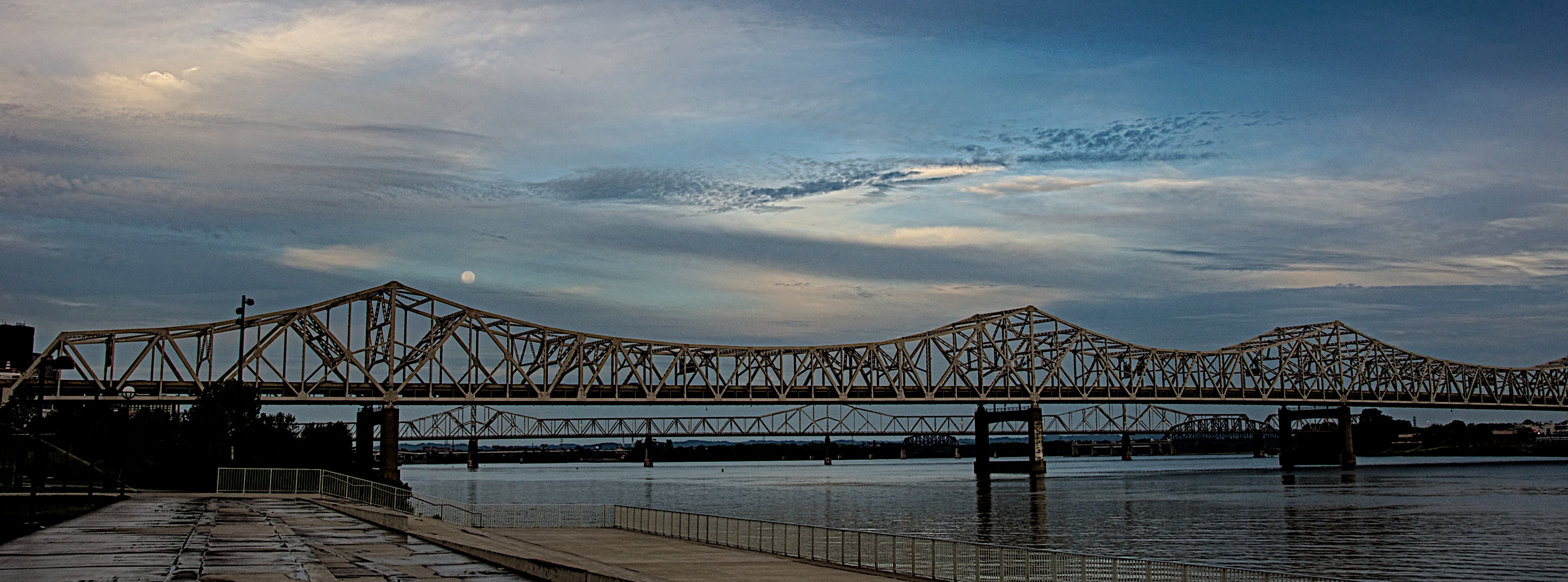
I went down to the riverfront yesterday morning to shoot the arrival of Hurricane Isaac in Louisville. Usually after a Gulf Coast hurricane moves inland it comes up the Mississippi River and then drifts east through the Ohio River Valley. I expected the sky to be rather dramatic and I was really hoping to capture the sunrise. I shot several images from Waterfront Park looking east and liked what I was getting. I applied my adage of “looking behind myself” to see if there was anything going on in the western sky when I saw the blue moon, a second full moon in one month, just above the Kennedy Bridge. The clouds were moving in from the southwest and I really liked the way they were drifting past the moon. I immediately shot a bracketed set of images from EV +2 through -2 in one stop amounts to capture as much detail as I could even though it was still at least 30 minutes before actual sunrise.

Back in the studio I opened the bracket set in NIK HDR Efex Pro 2 and merged them with the Ghosting Adjustment set to 20% which allowed the sky to stay as I envisioned it when I captured the scene. I started with the Deep 2 preset and adjusted the tone map and tonality until I had what I wanted. By boosting the Highlight and White sliders I got the moon to pop out of the clouds which was how I had originally envisioned the scene. I then took the image back into Aperture 3 where I cleaned up some sensor spots, subtly boosted the Vibrance slider and applied sharpening. I also cropped the final image into a panoramic framing to accent the linearity of the bridge before exporting it for the web.

A Postcard From Louisville

A Postcard From Louisville

Click on the image to open it at a larger size in another window.

I took this photo this morning from the Big Four Bridge looking southwest into Louisville. After cropping and adjusting the image in Aperture 3 I took it into NIK HDR Efex Pro 2 where I applied one of the Realistic presets, Deep 2. I adjusted the tonality as well as the black and white points before applying the Graduated Neutral Density filters. I dropped the sky approximately 1 stop and opened up the lower part of the image approximately 1/3 stop before adding the vignette to the final image.