Tag: HDR

iRobots

iRobots

I didn’t set out to make this image when I shot my brackets but once I was back in my studio at my computer the possibility of doing it came to me. I really liked the way the copper and stainless steel glowed under the industrial lights at Vendome Copper and Brass Works manufacturing facility here in Louisville. I thought the copper stills had characteristics that suggested that they were alien beings and I went with that idea. After merging the two versions I began to see various patterns in the image that further reinforced the concept.

The composition is symmetrical, something I usually avoid, but in this case it really works to give a sense of depth to the image. The composition also showcases the objects within the image and gives them new meanings. I especially like the many patterns that are formed in the space from the textures on the floor to the very back of the image.

The original image is another five exposure bracket set that was first merged in NIK HDR Efex Pro 2 and then using the Realistic (Deep) setting I did my final tone mapping. I tried to not go too far in my tone mapping in order to retain a sense of reality in the colors and textures within the scene.

I saved the resulting image back to Aperture 3 before exporting it to Photoshop CS5 where I duplicated it as a mirror image. I created this image by flipping my original shot side to side in Photoshop CS5; this left me with two images that I then merged into one image using Photoshop CS5.


Vendome Copper and Brass Works, Louisville, KY

Yesterday I downloaded the newest version of NIK HDR Efex Pro 2 which just came out this week. I had seen a webinar by NIK that showed the newest features of the app and I wanted to try it out. I am very impressed with the upgrade; the new version is much more refined than it’s predecessor which I already thought was the best HDR app I had used.

Today’s image was taken at Vendome Copper and Brass works here in Louisville. Vendome Copper and Brass Works is the main manufacturer of distilling equipment in the USA and the opportunity to photograph there was wonderful. They use a lot of copper to build these stills and distilling columns which made the place a fantastic place to photograph. I have several more images that I took while there and will be sharing them over the next few days.

This photo was processed from 5 frames taken at +2, +1, 0, -1, -2, Exposure Values. I could have just as easily used shutter speed to bracket the shots but my method is to adjust EV when shooting HDR brackets. I then took the images into NIK HDR Efex Pro 2 where I merged them and then applied the Realistic (Deep) preset and did some minor tweaking of the settings. After that I returned the image to Aperture 3 for sharpening and final output. If you are looking for an app for HDR processing I highly recommend NIK’s app, like everything else from NIK it is loaded with features and performs flawlessly.


Golden Hour on the Clark Memorial Bridge

Golden Hour on the Clark Memorial Bridge
(Click on the image to open in a separate window)

This image is on the Clark Memorial Bridge approach from Louisville looking north into Indiana. I chose this composition because I like the way the bridge railing and sidewalk lead the viewer’s eye into the image. The afternoon glow of the “Golden Hour” on the bridge and in the sky is a nice contrast to the coolness of the shadows in the lower third of the image.

I processed this image in NIK HDR Efex pro using the Realistic (Strong) preset as my base point. After the six images were merged I applied the anti-ghosting at the high setting which cleaned up the cars on the bridge and reduced the ghosting they were exhibiting. I then slightly adjusted the shadows and highlights sliders before saving the image back into Aperture 3. I then reopened the photo in Aperture 3 where I did some further enhancement to the colors and vibrancy before the final sharpening.

Bumsted

Bumsted

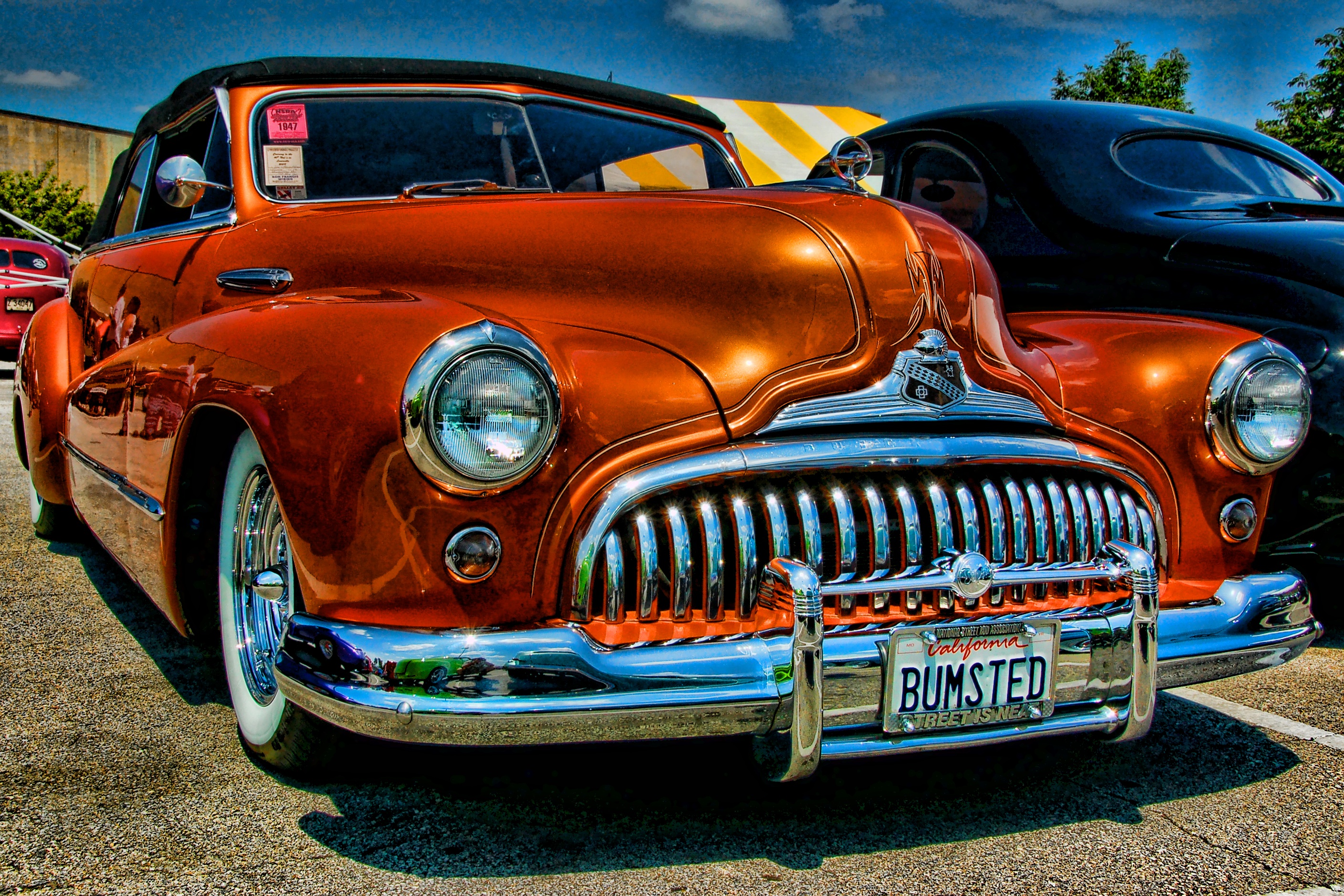
This image is another photo from the NSRA Streetrod Nationals in Louisville, KY. I processed this image using the Topaz Adjust Spicify preset. Not a lot to add about processing except to point out that the fact that when using presets such as Spicify there is always the potential for excessive noise in the image. I processed this image at a time when I was just starting to use Topaz Adjust and looking back at the image I would probably dial the strength of the preset down some in an effort to reduce the noise in the sky and the reflections in the paint on the car.

I like the composition for a couple of reasons in particular the low camera angle that really emphasizes the voluptuous form of the car. The placement of the subject creates a tension as the car seems to be moving forward in the frame. I did this to showcase that massive grill and front bumper and to emphasize the front vanity license plate. The complimentary colors of the orange car with the blue sky add interest from the standpoint of color balance.

Louisville Waterfront Sunset

Waterfront
Louisville Waterfront Sunset

I took this image last week from the Clark Memorial Bridge. I used five exposure values +2, +1, 0, -1, -2 to capture the scene. I then processed them in NIK HDR Efex Pro to merge and tonemap the image. I also reprocessed the merged image with the anti-ghosting feature set at medium to clean up the vehicles on the highway and any ghosting in the clouds.  I chose the Realistic Strong preset as my starting point and then tweaked the sliders until I had the colors and details where I wanted them. After that I returned the image to Aperture 3 for a little boost to the color temperature and sharpening.

I am especially pleased with the way the sky is reflected in the YUM Center in this image. I had been trying for several weeks to catch a sunset that was dramatic enough and high enough in the sky to reflect in the building’s convex glass. I checked cloud maps every evening for almost a month in hopes of being able to capture a dramatic sky such as this one. Many times the clouds would be where I wanted them 30 minutes before sunset only to fade away just as the sun set. On this particular evening the cloud map showed a  lot of clouds out to the west so I set up my camera and tripod on the Clark Memorial Bridge and waited for their arrival. I was rewarded by these clouds moving in at just the moment  the sun was setting.

Studying your location and accessing relevant sources, such as the cloud map, can really help when seeking to capture an image that you see in your mind’s eye. Keep this in mind the next time you wonder why you can’t seem to catch the scene you are seeking, patience and planning will eventually pay off if you do your part too.