Tag: HDR

Blue Moon of Kentucky

Blue Moon of Kentucky

Click on the image to open it at a larger size in another window.

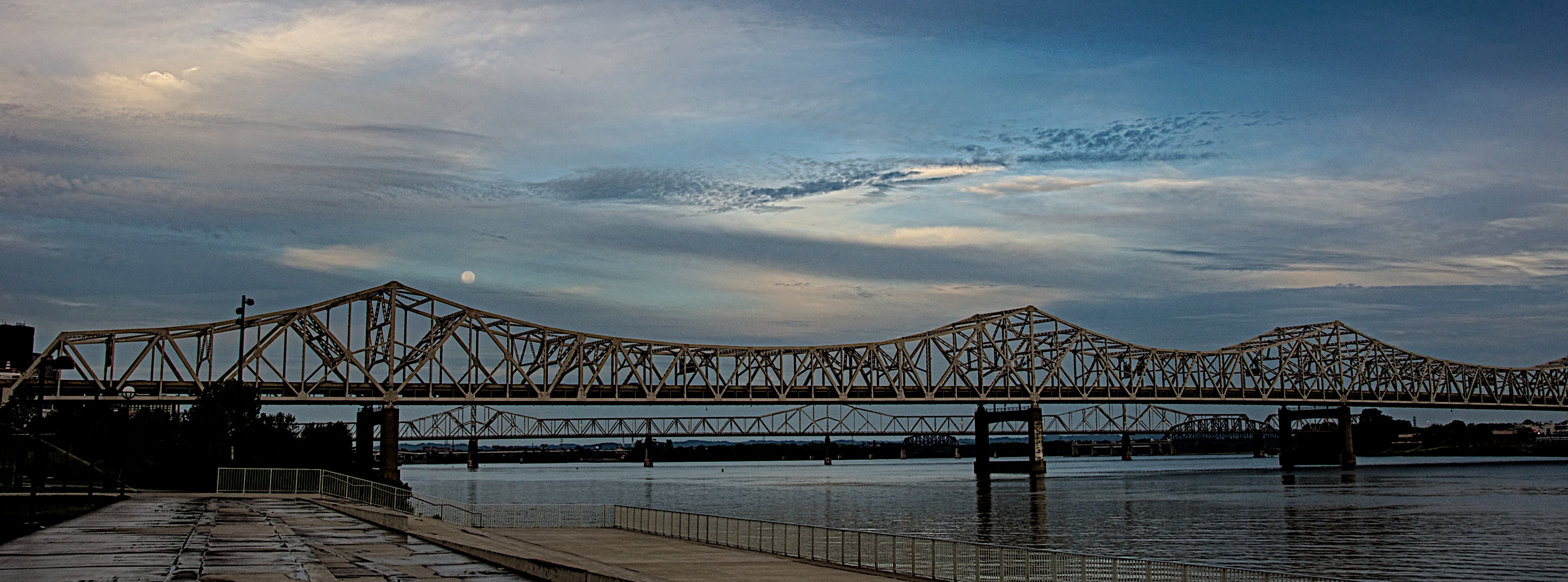
I went down to the riverfront yesterday morning to shoot the arrival of Hurricane Isaac in Louisville. Usually after a Gulf Coast hurricane moves inland it comes up the Mississippi River and then drifts east through the Ohio River Valley. I expected the sky to be rather dramatic and I was really hoping to capture the sunrise. I shot several images from Waterfront Park looking east and liked what I was getting. I applied my adage of “looking behind myself” to see if there was anything going on in the western sky when I saw the blue moon, a second full moon in one month, just above the Kennedy Bridge. The clouds were moving in from the southwest and I really liked the way they were drifting past the moon. I immediately shot a bracketed set of images from EV +2 through -2 in one stop amounts to capture as much detail as I could even though it was still at least 30 minutes before actual sunrise.

Back in the studio I opened the bracket set in NIK HDR Efex Pro 2 and merged them with the Ghosting Adjustment set to 20% which allowed the sky to stay as I envisioned it when I captured the scene. I started with the Deep 2 preset and adjusted the tone map and tonality until I had what I wanted. By boosting the Highlight and White sliders I got the moon to pop out of the clouds which was how I had originally envisioned the scene. I then took the image back into Aperture 3 where I cleaned up some sensor spots, subtly boosted the Vibrance slider and applied sharpening. I also cropped the final image into a panoramic framing to accent the linearity of the bridge before exporting it for the web.

Jason Odell’s NIK HDR Efex Pro 2 eBook Review

As many of you know I have been using NIK HDR Efex Pro 2 since it was first released. I think it is the best HDR plugin on the market today and I wanted to see how another photographer found using it. I found Jason Odell’s eBook on NIK HDR Efex Pro 2 and decided to give it a try. I’m glad I did.

I had the opportunity this past week to read  Jason Odell’s eBook “The Photographer’s Guide to HDR Efex Pro 2” I found it to be well written and very instructive. Jason does an excellent job of guiding anyone new to NIK HDR Efex Pro 2 in setting up and using the software. His instructions are complete and concise and make getting started with NIK HDR Efex Pro 2 a simple task. He goes into detail about the use of each slider and feature so that the reader can understand and predict what each one will do once they start using NIK HDR Efex Pro 2.

Jason covers the anti-ghosting feature very well and offers tips that help the reader make good decisions about when and how much anti-ghosting to apply. His observations parallel my own experience with the anti-ghosting feature which is that it isn’t always desirable to apply the anti-ghosting  at 100%; doing so can produce unwanted results with some images. I, like Jason, often find that using it at 20% is effective and eliminates  unwanted results in some images such as those with a lot of sky.

Jason includes several examples of images that he used NIK HDR Efex Pro 2 on and explains which settings he used and why he used them. He shows his readers how to create everything from realistic HDR images through surrealistic HDR images and offers excellent commentary on the subjects.

As an added perk he includes 40 presets that he has developed and he also goes into great detail about how the reader can expand on or develop their own presets too.

All in all I think “The Photographer’s Guide to HDR Efex Pro 2” is an excellent manual for anyone interested in learning how to use NIK HDR Efex Pro 2 and well worth the price. I’m glad I read it and have it as a reference book when I need to figure out how to use NIK HDR Efex Pro 2 more effectively.

If you are looking for a great book on NIK HDR Efex Pro 2 then by all means get this one you won’t be sorry.

You can find the book at http://www.luminescentphoto.com/hdrguide.html and download it to your computer in minutes. There is also a link to Jason’s order page in the sidebar under the Blogroll and Training tabs.

Morning on the Big Four Bridge Project

Morning sunrise on the Big Four Bridge jobsite.
Start of the Workday

Click on the image to open it at a larger size in another window.

This image is a single frame that I did the RAW processing in Aperture 3 on before taking it into NIK HDR Efex Pro 2 where I used the Deep 2 preset as a starting point. I had to fiddle with many of the tonality sliders before I could get it where I wanted it. I had to be careful with the structure slider in particular because it was emphasizing the noise in the sky. I then brought the image back to Aperture 3 and performed a little cropping and noise reduction before saving this final version.

I feel really fortunate to be allowed up here to shoot this project. The men on the job are justifiably  proud of their work in rescuing the bridge and converting it from a former railroad bridge into a pedestrian bridge linking Louisville with Jeffersonville Indiana.

A Postcard From Louisville

A Postcard From Louisville

Click on the image to open it at a larger size in another window.

I took this photo this morning from the Big Four Bridge looking southwest into Louisville. After cropping and adjusting the image in Aperture 3 I took it into NIK HDR Efex Pro 2 where I applied one of the Realistic presets, Deep 2. I adjusted the tonality as well as the black and white points before applying the Graduated Neutral Density filters. I dropped the sky approximately 1 stop and opened up the lower part of the image approximately 1/3 stop before adding the vignette to the final image.

Morning on the Ohio River

Morning Rower
Morning Rower

Click on the image to open it at a larger size in another window.

This image was taken this morning from the Big Four Bridge pedestrian ramp looking west toward Louisville. I spotted this rower and thought he made an interesting subject. The reflections on the river surface interested me too and I tried to frame the image in a way that would accentuate them.  I shot this image with my Nikkor 18-200 mm lens and a rented Nikon D90 and am a little concerned with the focus. I dropped this lens a couple of nights ago at the state fair and I’m worried that it may be slightly off in auto focus mode as the image looks a little soft to me. The past week I broke the cable release socket on my own D90 and had to send it in for service. As soon as it is back from the repair shop I think I’ll need to send the lens in for evaluation. I want to put it on my own camera first though to see if the rented camera may be the culprit.

I processed this as a single frame HDR using NIK HDR Efex Pro 2 using the Realistic preset. I dropped a couple of control points in the trees on the left to bring down the exposure there which was a little too wide due to the sunlight on the birch trees and the shadow being cast by the bridge. I them took the image back into Aperture 3 where I applied some noise reduction and adjusted the vibrancy slider before giving it a little sharpening.
