Tag: HDR

Concrete Pour Equipment

Concrete Pump Boom
Concrete Pump Boom

Click on the image to enlarge it in a new window.

This image shows the concrete pump boom transferring concrete to a pier pour in the middle of the river. The concrete is first transferred from the delivery trucks to the concrete pump which is sitting on shore. The concrete pump then pushes the wet concrete through the large pipe on the boom to the concrete placement workers who direct it’s placement in the concrete form in the river.

I chose this composition to emphasize the length that the material must be transported in order to make the piers in the river. I shot a three frame bracket set of -2, o and +2 EV and then processed the final image by merging them in NIK HDR Efex Pro 2. After merging them and applying some basic tone-mapping adjustments I returned the image to Aperture 3 for final processing.

Concrete Vibrator Operator at Work During the Pier Pour.

Click on the image to enlarge it in a new window.

In this image the vibrator operator is using a control box he is wearing around his waist to vibrate the wet concrete and eliminate any air pockets that may have formed as the concrete was placed in the form. The metal rebar that he is standing inside will connect the next pice of concrete to this base after additional forms are attached as the tower base rises out of the river. This particular concrete pour required 53 truck loads of concrete, 537 cubic yards of material, and took nearly an entire workday to complete.

This image is also a three frame bracket set processed with NIK HDR Efex Pro 2 and Aperture 3.
Lowering the Caisson into the Pier Casing

Lowering the Caisson into the Casing.

Click on the image to enlarge it in a new window.

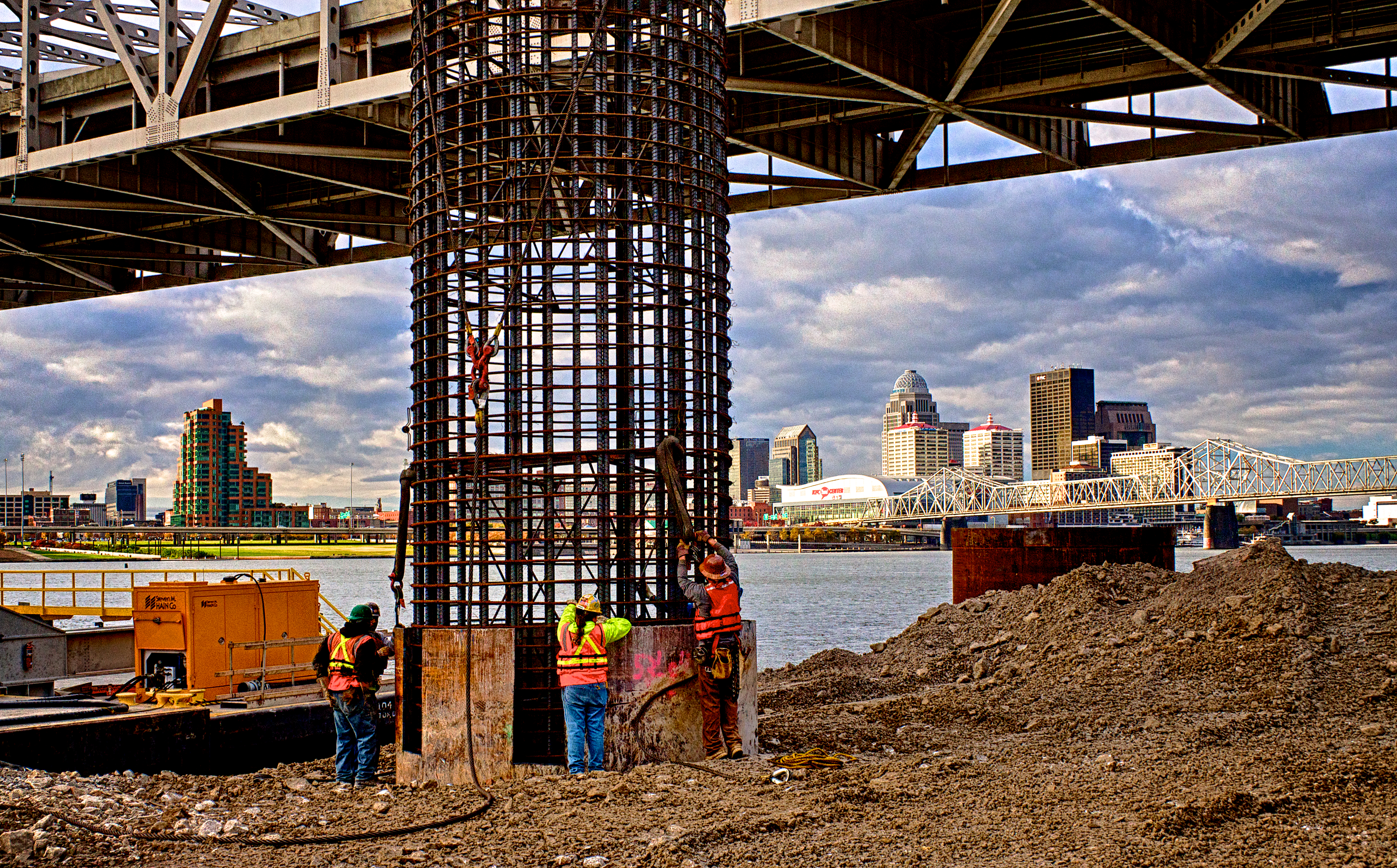
This HDR image shows the 60 foot long caisson as it is being guided, by the Ironworkers and Carpenters, into place inside the pier casing. After placing the caisson the next step will be to fill the pier with concrete. The steel casing sits on the river bottom and then the caisson fits into a rock socket has been bored 30 feet below the casing into the bedrock of the river bottom. This makes the total length on the pier nearly 60 feet from the surface to the base. The iron cylinder is there to both guide the drill during drilling and to form a protective shell for the pier once the bridge is built.

This image is from a three frame bracket set using -2, 0 and +2 EV settings. I merged the bracket set in NIK HDR Efex Pro 2 and because the workers were moving quite a bit I had to apply 80% anti-ghosting to isolate them and remove the ghosts of their arm movement. After merging and some mild tone-mapping in NIK HDR Efex Pro 2 I returned the merged file to Aperture 3 where I completed my processing by adjusting contrast, alignment, sharpening and the individual color channels to achieve the look I wanted for the final image.

Rigging for the Caisson Pick

Rigging the Caisson For Lifting #1
Rigging the Caisson For the Pick #1

Click on the image to enlarge it in another window.

These Ironworkers are setting the rigging to pick this caisson and right it so that it can be lowered into the casing for final placement. To lift it two cranes must coordinate their actions so that the main crane can upright the assembly and transfer it from the barge to the pier casing. Photo Tip: Having the men in the photo helps give scale to the size of the structure.

Once more this is a three bracket set of exposures using -2, 0 and +2 EV to capture the broad dynamic range between the sky and the foreground I encountered. This is one of the most important reasons to learn and use HDR techniques so that in a situation like this there is a reasonable chance that there will be enough data to create a good image after merging the exposures.

I used NIK HDR Efex Pro 2 and Aperture 3 to merge and process the image.

Rigging the Caisson For Lifting #2
Rigging the Caisson For the Pick #2

Click on the image to enlarge it in another window.

This second image is not an HDR image. There was too much movement of the cables and hooks, between frames in the bracket set; for the anti ghosting to handle in NIK HDR Efex Pro 2. I decided to take the normal (0 EV) exposure into Topaz Clarity to see how well it would do with the wide dynamic range. All in all I am fairly pleased with the way that I was able to bring out some shadow detail and still hold the sky detail using a single exposure. I know some folks like to take the normal exposure and change the exposure value in subsequent copies for a faux HDR look but I don’t go that route since there isn’t any additional data captured as there is when a bracket set is used.


Using HDR Photography to Create Your Own Personal Style Workshop

Nick Roberts – Using HDR Photography to Create Your Own Personal Style Tickets in Louisville, KY, United States.

Fourth of July Funnel Cakes

Click on the image to enlarge it.

There is still time to join me for my HDR workshop in Louisville, KY, November 9, 2013. Learn how to use HDR techniques and NIK HDR Efex Pro 2 to create images that reflect your own personal style in this hands on workshop. You’ll be taught how to shoot for HDR along with what equipment you’ll need.

Ohio River Sunset Panorama

Click on the image to enlarge it.

We will also go over shooting handheld brackets, using single frames and software plugins to create faux HDR and applying plugins from Topaz Labs and onOne Software to get unique results without beating your brains out in Photoshop. My past workshop participants have all said it was well worth the time and money to attend and they still share images with me that show how well the class prepared them to build their HDR expertise.

Parkland Morning
Parklands Morning

Click on the image to enlarge it.

Learn how to create images that defy the cliched, halo riddled, over saturated, grungy look that many people think of when thinking about HDR. After this workshop you will have the knowledge and the tools to create realistic yet powerful HDR images that show your vision for the subject without drawing attention to the technique that you used. In addition to learning how to use HDR to improve your images we will also talk about composition and it’s contribution to successful and memorable images.

==========================================================

I have an affiliate relationship with Topaz Labs and onOne Software, and earn a small commission, which helps support this site, on any sales that are made by using the links below. Even if you aren’t ready to make a purchase you can use the links to access a Free 30 day trial of any of these products to determine whether or not they will fit your own digital workflow.

http://www.topazlabs.com/705.html

http://www.onOnesoftware.com/affiliates/idevaffiliate.php?id=459

One additional thing to note is that both Topaz FX and onOne Perfect Photo Suite can be used as stand alone photo editing programs as well as plugins for Photoshop, Lightroom, Aperture and Photoshop Elements. Both Topaz FX and onOne Perfect Photo Suite have built in layering features that make it possible to combine their own plugins when using them.

==========================================================

Color and B&W HDR Versions of the Same Image

Construction Cranes on the Indiana Side of the Ohio River Bridges Project Downtown Crossing #1

Click on the image to enlarge it in another window.

Today I am sharing two versions of the same image. For the color image I used NIK HDR Efex Pro 2 to merge the three frame bracket set. I applied the default preset and then returned it to Aperture 3 for contrast and color adjustments.

Construction Cranes on the Indiana Side of the Ohio River Bridges Project Downtown Crossing B&W Version

Click on the image to enlarge it in another window.

I decided to try  OnOne Perfect B&W to convert the color HDR into a black and white HDR image. I started with the default B&W setting that OnOne Perfect B&W provided and tweaked it to adjust the contrast until it was the way I wanted it.  Not much more I can say about this one.
