Tag: composition

Vendome Copper and Brass Works

Still Waiting

This is another image from my trip to Vendome Copper and Brass Works. In this image I was intrigued by the contrast of the highly polished stainless steel fittings with the lightly oxidized copper. I liked the way the overhead lights were reflecting under the bulb shaped area and the overall sheen that the metallic surfaces had.

The composition is a rule of thirds arrangement which gives the overall image a balanced feel. I placed the foreground element in the lower third of the frame to lead the viewer’s eye into the scene while the vertical elements serve to lead the eye up and back into the image.

I processed this image in Aperture 3 to adjust the composition and slightly crop it. I then opened it in NIK HDR Efex Pro 2 where I once again went with the Realistic (deep) preset where I tweaked the intensity and texture of the scene. I then returned it to Aperture 3 for some light sharpening and a little vibrance adjustment.


iRobots

iRobots

I didn’t set out to make this image when I shot my brackets but once I was back in my studio at my computer the possibility of doing it came to me. I really liked the way the copper and stainless steel glowed under the industrial lights at Vendome Copper and Brass Works manufacturing facility here in Louisville. I thought the copper stills had characteristics that suggested that they were alien beings and I went with that idea. After merging the two versions I began to see various patterns in the image that further reinforced the concept.

The composition is symmetrical, something I usually avoid, but in this case it really works to give a sense of depth to the image. The composition also showcases the objects within the image and gives them new meanings. I especially like the many patterns that are formed in the space from the textures on the floor to the very back of the image.

The original image is another five exposure bracket set that was first merged in NIK HDR Efex Pro 2 and then using the Realistic (Deep) setting I did my final tone mapping. I tried to not go too far in my tone mapping in order to retain a sense of reality in the colors and textures within the scene.

I saved the resulting image back to Aperture 3 before exporting it to Photoshop CS5 where I duplicated it as a mirror image. I created this image by flipping my original shot side to side in Photoshop CS5; this left me with two images that I then merged into one image using Photoshop CS5.


Golden Hour on the Clark Memorial Bridge

Golden Hour on the Clark Memorial Bridge
(Click on the image to open in a separate window)

This image is on the Clark Memorial Bridge approach from Louisville looking north into Indiana. I chose this composition because I like the way the bridge railing and sidewalk lead the viewer’s eye into the image. The afternoon glow of the “Golden Hour” on the bridge and in the sky is a nice contrast to the coolness of the shadows in the lower third of the image.

I processed this image in NIK HDR Efex pro using the Realistic (Strong) preset as my base point. After the six images were merged I applied the anti-ghosting at the high setting which cleaned up the cars on the bridge and reduced the ghosting they were exhibiting. I then slightly adjusted the shadows and highlights sliders before saving the image back into Aperture 3. I then reopened the photo in Aperture 3 where I did some further enhancement to the colors and vibrancy before the final sharpening.

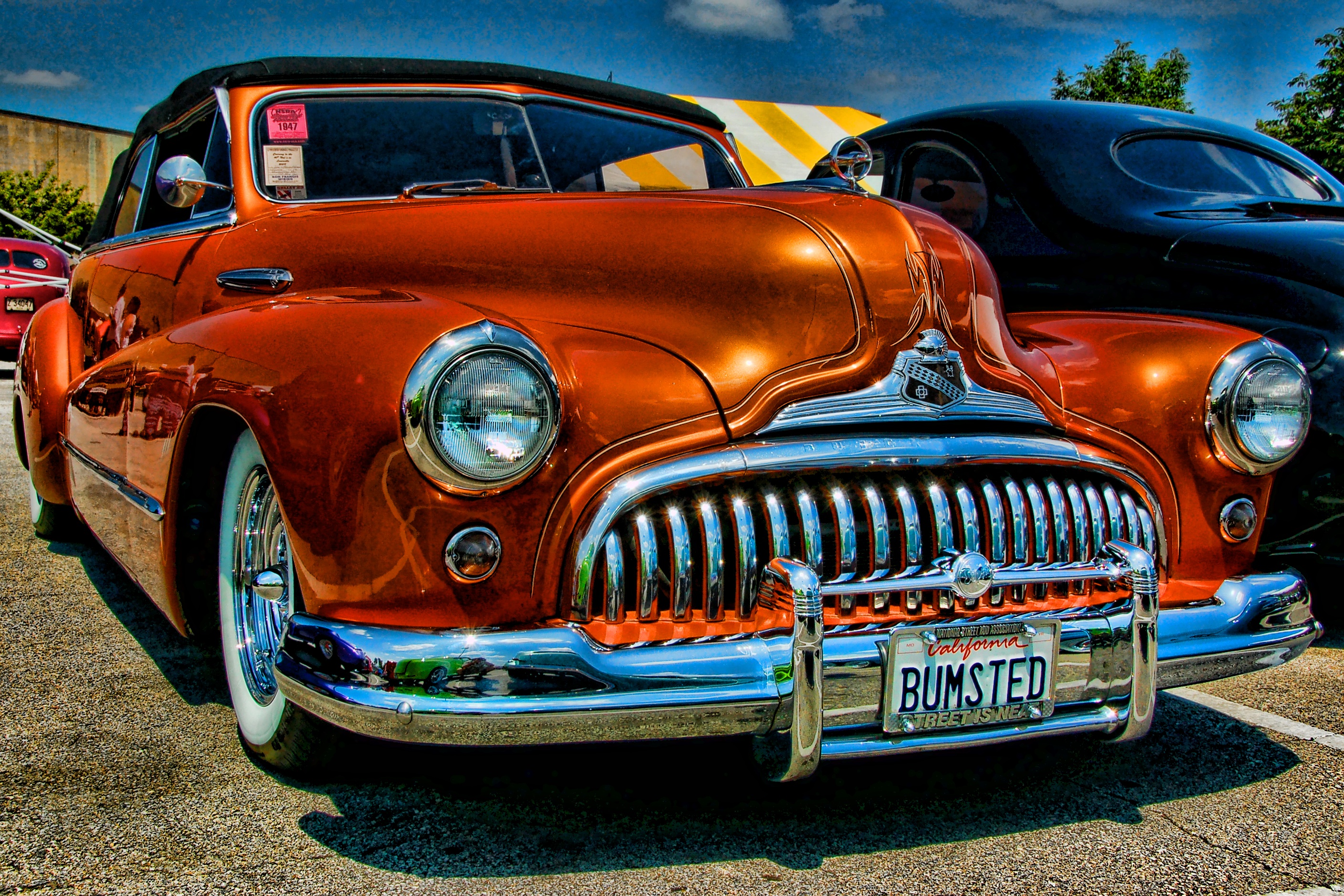
Bumsted

Bumsted

This image is another photo from the NSRA Streetrod Nationals in Louisville, KY. I processed this image using the Topaz Adjust Spicify preset. Not a lot to add about processing except to point out that the fact that when using presets such as Spicify there is always the potential for excessive noise in the image. I processed this image at a time when I was just starting to use Topaz Adjust and looking back at the image I would probably dial the strength of the preset down some in an effort to reduce the noise in the sky and the reflections in the paint on the car.

I like the composition for a couple of reasons in particular the low camera angle that really emphasizes the voluptuous form of the car. The placement of the subject creates a tension as the car seems to be moving forward in the frame. I did this to showcase that massive grill and front bumper and to emphasize the front vanity license plate. The complimentary colors of the orange car with the blue sky add interest from the standpoint of color balance.

Homage to the Renaissance

Reflections in a Chrome Eye

Sometimes the simplest things can yield surprising results. As I searched the Streetrod Nationals for reflections in cars I came across this car parked in the grass which was a great mirror for the two red vehicles parked nearby. I thought about the way the painters of the Renaissance used convex mirrors in their paintings to capture distorted perspective and decided to go with that concept.

I would call this a radial composition due to the many concentric circles which focus the viewer’s eye on the image within the image though it also conforms to the rule of thirds. The colors in the image are primarily red and green which are complimentary colors and lend harmony to the scene and further strengthen the composition. I also enjoy the way the colors in the wheel are inverted from the center section where the green grass and blue sky are revealed; to the outer portions of the wheel where the green is now on the upper side and the blue has moved to the bottom. The reds of the reflected vehicles benefit too from the red jewel on the tire’s valve cap which adds a small foreground element to the image.

I first processed this image with Aperture 3 where I cropped it slightly to remove extraneous details that were interfering with my initial concept for the photo. I then I opened it in Topaz Adjust for the final enhancements which intensified the colors in the chrome and the scene within the center cap, along with the sky.