Tag: clouds

Construction Cranes in HDR

Walsh Construction Cranes on the Ohio River Bridges Project.

Click on the image to enlarge it in another window.

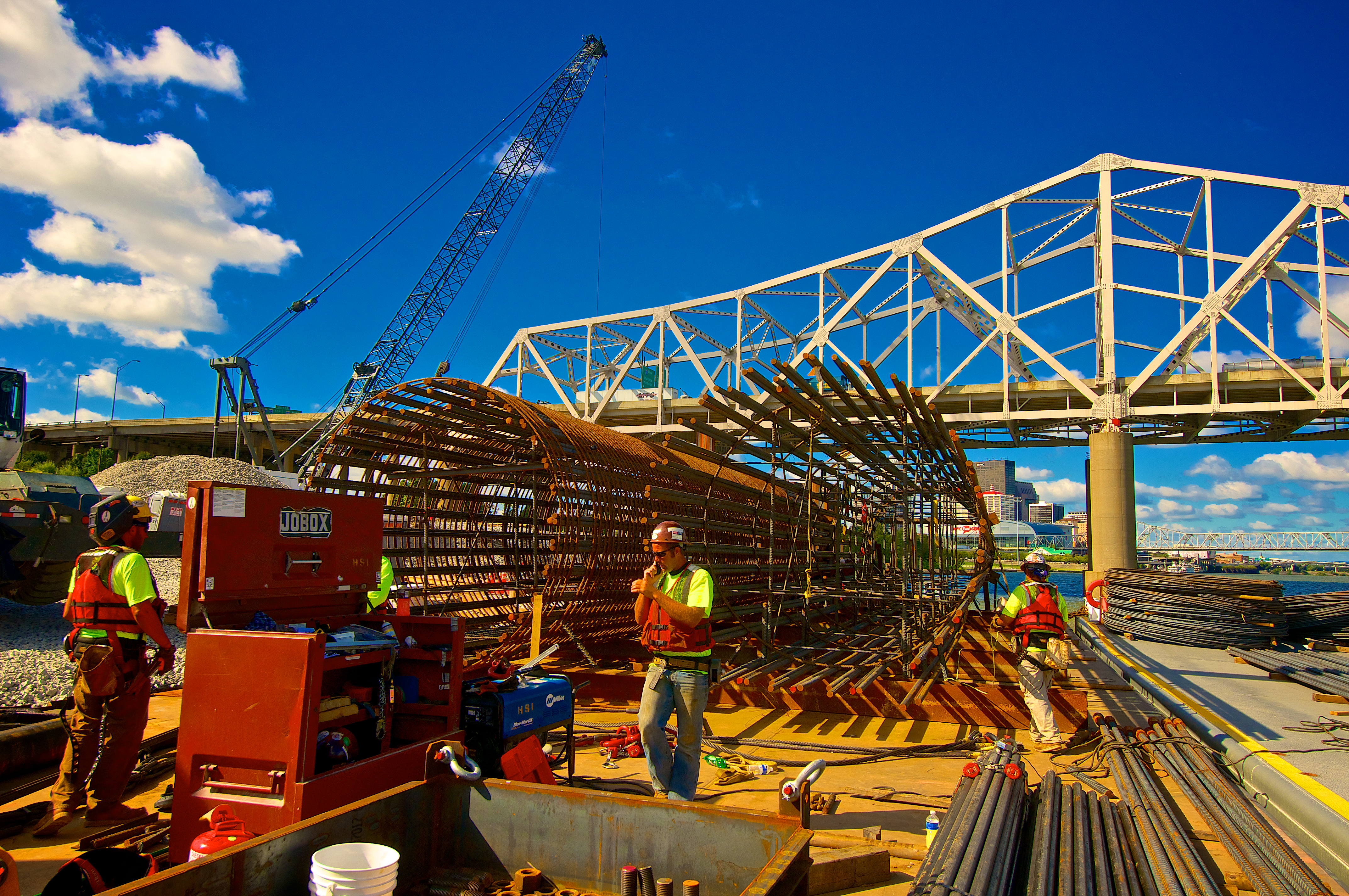
Cranes are the workhorses for Walsh Construction on their Ohio River Bridges Project. In this view from the Indiana landing there are two large cranes on barges in the river and if you look along the horizon you can see at least six more cranes. They are being used to move material and to set the pile drivers in place on the Kentucky side of the river where there are going to be over fifty structures erected in the reconstruction of Louisville’s Spaghetti Junction.

This HDR image is another three frame bracket set +2, 0 and -2 EV at f8. I merged them in NIK HDR Efex Pro 2 and finished the merged image in Aperture 3. After that I took the HDR image into Photoshop and applied some lens correction as well. I’m starting to limit my use of the structure slider in NIK HDR Efex Pro 2 because I think it is introducing graininess into the skies. I still use a little to punch up the details but not nearly as much as I have in the past. When in Aperture 3 I have also limited the use of the details slider for the same reason.

HDR Image of the Ohio River in Black and White

B&W HDR Image of the Downtown Span Construction Sites on the Ohio River in Louisville, KY.

 Click on the image to enlarge it in another window.

This image was taken from the Big Four Bridge looking west over Waterfront Park and the Ohio River in Louisville Kentucky. It was a busy morning on the river, the construction tug was moving barges for the Ohio River Bridges Project, the Belle of Louisville was headed upriver and a tugboat was pushing the largest size tow downriver, five barges long and three barges wide, that can go through the McAlpine Locks at one time. The Ohio river carries more traffic than any river in America delivering cargo from Pennsylvania in the northeast to the Mississippi River in the west and vice versa.

I decided to make this image Black and White after merging it in NIK HDR Efex Pro 2. I first took it into Aperture 3 after merging my three frame bracket set where I applied some additional contrast and a vignette to the HDR image before opening it in Topaz B&W Effects 2.1 where I chose the Platinum preset. I adjusted the paper tone slightly as well as adding some additional contrast adjustments that the Topaz B&W version seemed to need.

==========================================================

Don’t miss the 50% 0ff sale on Topaz Adjust  that is going on until September 30,2013. Topaz Adjust doesn’t go on sale very often and this is a great chance to save some money and get a true workhorse of a program. My entry into the world of plug-ins began with Topaz Adjust and I recommend that anyone wanting to explore that world take advantage of this opportunity.  Use the link below and the discount code septadjust when you order.

http://www.topazlabs.com/705.html

While there consider purchasing the entire Topaz Suite of programs. Topaz has done a lot of improving in the past few years and offers a very good line of software plug-ins that work well with Photoshop, Lightroom and Aperture 3.

==========================================================

This Is Why I Get Up Early Each Day

Iron workers Placing Reinforcement Steel into Concrete Form For Pier Cap.

Click on the image to open it in another window.

I get up every morning hoping to find a sky with this much texture and color. On this particular morning I was given a wonderful start to the day when I saw the colors start to intensify as the sun rose in the sky. The morning light and the wide range of light made this scene a natural for shooting it as a high dynamic range image. Even with such a wide range it was only necessary to use +2, 0 and -2 EV to capture the shadow details as well as the highlights and mid-tones. I try to keep the number of frames I use to a minimum to help combat the noise that inevitably occurs when underexposing the frame to capture the highlights and then merging them to create the HDR image.

The more I use HDR techniques and adjustments the more comfortable I become with them. In my book NIK HDR Efex Pro 2 is the leader for creating realistic HDR images with minimal halos and believable transitions across the tonal range. I want my images to convey a sense of the wonder I feel when I’m shooting them and the natural beauty in the scene. In this image I am very pleased with the balance of warm and cool light and the peaceful mood that accompanies sunrise on the river.


The Ironworker’s Barge

The Ironworker's Barge
The Ironworker’s Barge

Click on the image to enlarge it in another window.

This image is from the work barge where the ironworkers are constructing the reinforcement frameworks that will be placed inside the bridge piers before the concrete in poured. I processed it in Aperture 3 without any additional plug-ins.

Construction Cranes

Cranes are the backbone of the construction process.
Cranes are essential to the construction process.

Click on the image to enlarge it in another window.

One of the most iconic pieces of heavy equipment on any major construction project is the crane. These monsters are essential to the Ohio River Bridges Project. Wherever I see cranes I can be sure there is some heavy work being done. They are used to move the massive steel beams, heavy timbers, sheet piling, concrete forms and other large items on the ORB. The crane operators have to be able to move their loads into very precise positions in order for the people on the ground to perform their tasks. The hand eye coordination required is incredible especially when you consider that almost all communication with the crane operator is done via hand signals. The more I am around them the more respect I have for their skills moving items that weight in the tons safely and precisely.

The difficulty I face when shooting cranes is my desire to include their long booms in the composition. Unless there is something else in the sky they can become nothing more than tall vertical elements. When I shoot them I look for mornings when the sky is filled with clouds or the sun is rising behind them. In this image I was able to include the heavy clouds for a background. I used the cranes themselves as repeating forms that provide strong diagonal lines within the composition and convey the scale of the scene.

This image is a HDR created from my standard three frame bracket set of +2, 0 and -2 EV. I merged them in NIK HDR Efex Pro 2 and did my initial tone mapping there. I then returned the file to Aperture 3 where I adjusted contrast, color channels, saturation and vibrance. Finally I applied my sharpening and added a small vignette to focus the viewer’s eyes within the frame.