Tag: clouds

Isaac Was Coming to Visit

Isaac is Coming to Visit Soon

Click on the image to open it at a larger size in another window.

Today’s image is another shot from Waterfront Park looking east. As I mentioned in my earlier posts this week I expected some dramatic skies with the approach of Hurricane Isaac into the Ohio River Valley. I wasn’t disappointed and my early arrival in Waterfront Park revealed this scene as it unfolded before me. It was around 7:00 AM and the sun had not quite risen over the horizon, the clouds were layered across the sky and the sunlight was just starting to filter up through them. The colors and texture of the sky were exactly what I had hoped for as drove into the city to shoot from the eastern end of Waterfront Park. The building on the left is the University of Louisville Boathouse and the building in the center is a new condo complex being built adjacent to the new Louisville Marina.

I decided to process this image from a single file, from my bracket set, to see how well NIK HDR Efex Pro 2 would handle it. The more I use NIK HDR Efex Pro 2 the more impressed I am with it’s ability to render the image in a way that suits my vision for it. More and more I am able to use NIK HDR Efex Pro 2 on single frames and achieve realistic HDR images that rival those, that in the past, required a large bracket set to produce. I’m not interested in seeing how many images I can merge just for the sake of saying that I did it. As I see HDR processing it is simply an extension of the Dodging and Burning that I was doing years ago in the darkroom when I wanted to tone down the highlights or open up the shadows.

My goal as a photographic artist is to produce an image that captures my personal feeling and vision for the scene and if I can do that with one or two images I’m quite satisfied. This does not mean that I am giving up on using multiple images over a broad exposure range when I need them in order to capture the entire tonal range of a scene that is beyond the capability of my camera’s sensor. It simply means that I have more options at my disposal. NIK HDR Efex Pro 2 is a super program and I recommend that you try it for yourself.

After processing the image in NIK HDR Efex Pro 2 I returned it to Aperture 3 where I adjusted the vibrance slider, retouched a few sensor spots, cropped out a billboard on the right side of the frame and finally added some sharpening before saving it as a jpeg for the web.

Sunrise in Waterfront Park

Looking east from Waterfront Park near the University of Louisville Boat House
Sunrise in Waterfront Park

Click on the image to open it at a larger size in another window.

As Hurricane Isaac moved north on Saturday I headed for Waterfront Park to capture what I hoped would be a dramatic sunrise. Isaac came past Louisville Saturday from the southwest. As a result most of the clouds were still off to the west of Louisville and the edge of the storm was just coming into Louisville early Saturday. This gave me an opportunity to photograph a rather dramatic sky before the body of the storm settled in north of Kentucky across central Indiana.

Instead of using my entire bracket set for this image I decided to try using the +2, 0, and -3 Exposure Values, three exposures instead of the six I shot, to see if I could produce a realistic HDR image. I found that doing this really lightened the load on my iMac processor and markedly speeded up the merging process in NIK HDR Efex Pro 2. My iMac is at a disadvantage when using the latest software because the GPU is too weak for some software to use so all processing must be done by the CPU. It doesn’t affect the final images but it does slow down my processing time considerably if I must use all images in a bracket set.

I noticed some Chromatic Aberration in the trees so I employed the Chromatic Aberration feature in NIK HDR Efex Pro 2 and removed a purple fringing that was occurring in the image. I used the Deep 2 preset in NIK HDR Efex Pro 2 to tone map and adjust the tonality before returning the image to Aperture 3 for final processing. The rental Nikon D90 I’m using has a lot of spots on the sensor but since it isn’t mine I’m not taking any chances of damaging it by attempting to clean it. Instead I must go over each image with a fine tooth comb looking for sensor spots. Aperture 3 does  good job of removing these spots when I use the Retouch tool Spot and Patch feature. It is tedious work and I’ll be happy when my camera is back from repair, fresh and clean, and in proper working order. I also adjusted the Vibrancy and Sharpened the image before exporting it for the web.


Blue Moon of Kentucky

Blue Moon of Kentucky

Click on the image to open it at a larger size in another window.

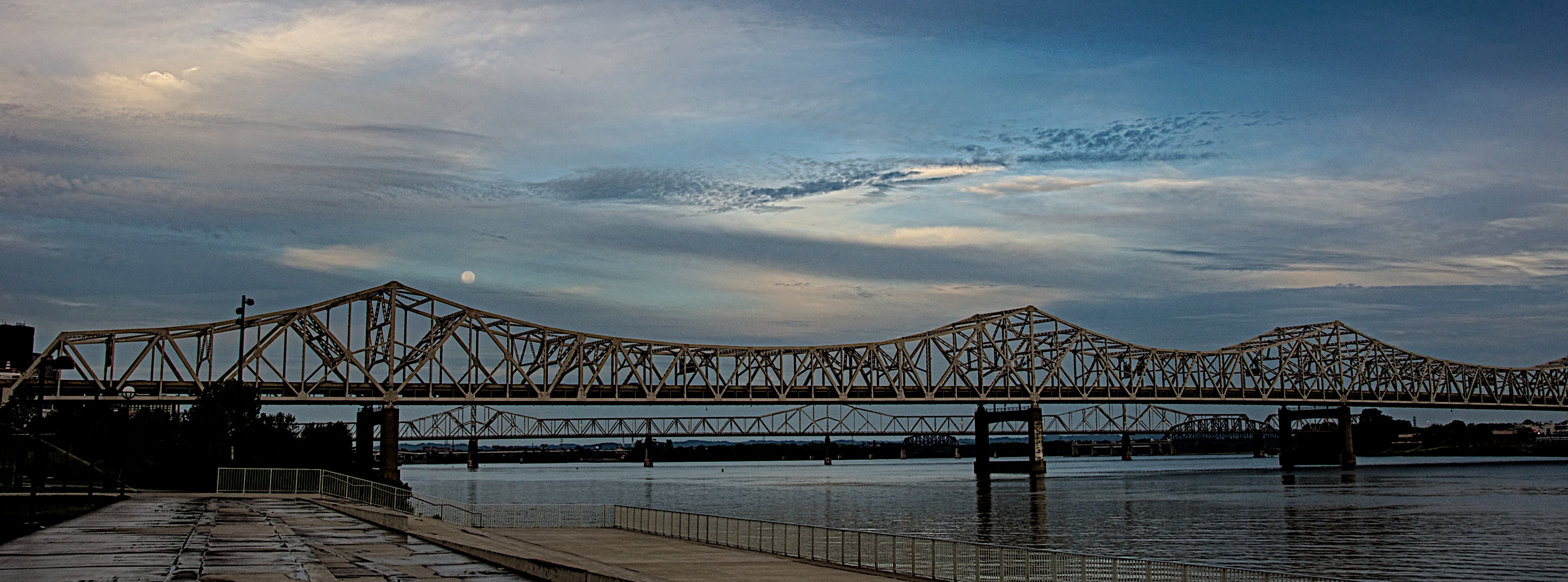
I went down to the riverfront yesterday morning to shoot the arrival of Hurricane Isaac in Louisville. Usually after a Gulf Coast hurricane moves inland it comes up the Mississippi River and then drifts east through the Ohio River Valley. I expected the sky to be rather dramatic and I was really hoping to capture the sunrise. I shot several images from Waterfront Park looking east and liked what I was getting. I applied my adage of “looking behind myself” to see if there was anything going on in the western sky when I saw the blue moon, a second full moon in one month, just above the Kennedy Bridge. The clouds were moving in from the southwest and I really liked the way they were drifting past the moon. I immediately shot a bracketed set of images from EV +2 through -2 in one stop amounts to capture as much detail as I could even though it was still at least 30 minutes before actual sunrise.

Back in the studio I opened the bracket set in NIK HDR Efex Pro 2 and merged them with the Ghosting Adjustment set to 20% which allowed the sky to stay as I envisioned it when I captured the scene. I started with the Deep 2 preset and adjusted the tone map and tonality until I had what I wanted. By boosting the Highlight and White sliders I got the moon to pop out of the clouds which was how I had originally envisioned the scene. I then took the image back into Aperture 3 where I cleaned up some sensor spots, subtly boosted the Vibrance slider and applied sharpening. I also cropped the final image into a panoramic framing to accent the linearity of the bridge before exporting it for the web.

Between the Bridges

Between the Bridges
Between the Bridges

Click on the image to open it at a larger size in another window.

This shot is a single frame that was first edited in NIK HDR Efex Pro 2 to adjust the tone map and tonality. I also added the vignette while in there. I then took the image back to Aperture 3 to sharpen it. I thought the preset added too much noise so I applied the Aperture 3 denoise adjustment and softened it slightly. I also boosted the vibrancy and detail a small amount to make the sky pop.

Water Tower and Distilling Plant

Water Tower #1

Click on the image to open it at a larger size in another window.

This is the last set of brackets I was able to shoot when I was on the abandoned distillery this week. Right after these shots were taken the caretaker arrived and asked me to leave.

I shot four exposures of this scene and then merged them in NIK HDR Efex Pro 2. I’ve discovered that using the anti-ghosting at 100% is not necessary and can even cause serious halo issues with bright area such as the sky. I dialed it down to 20% and the results are much better. I really don’t have a lot more to say about this image.
